Vernissage — the art gallery and artist portfolio Framer template
The art gallery and artist portfolio template. A loader that switches the gallery lights on, then the current exhibition painted in brush stroke by brush stroke with its wall labels — then a walk through the room, the artists you represent, a salon hang of available works, exhibition posters, a wire the collector steps hang from, a floor plan, and every artwork shown to scale on a wall.
What Vernissage is
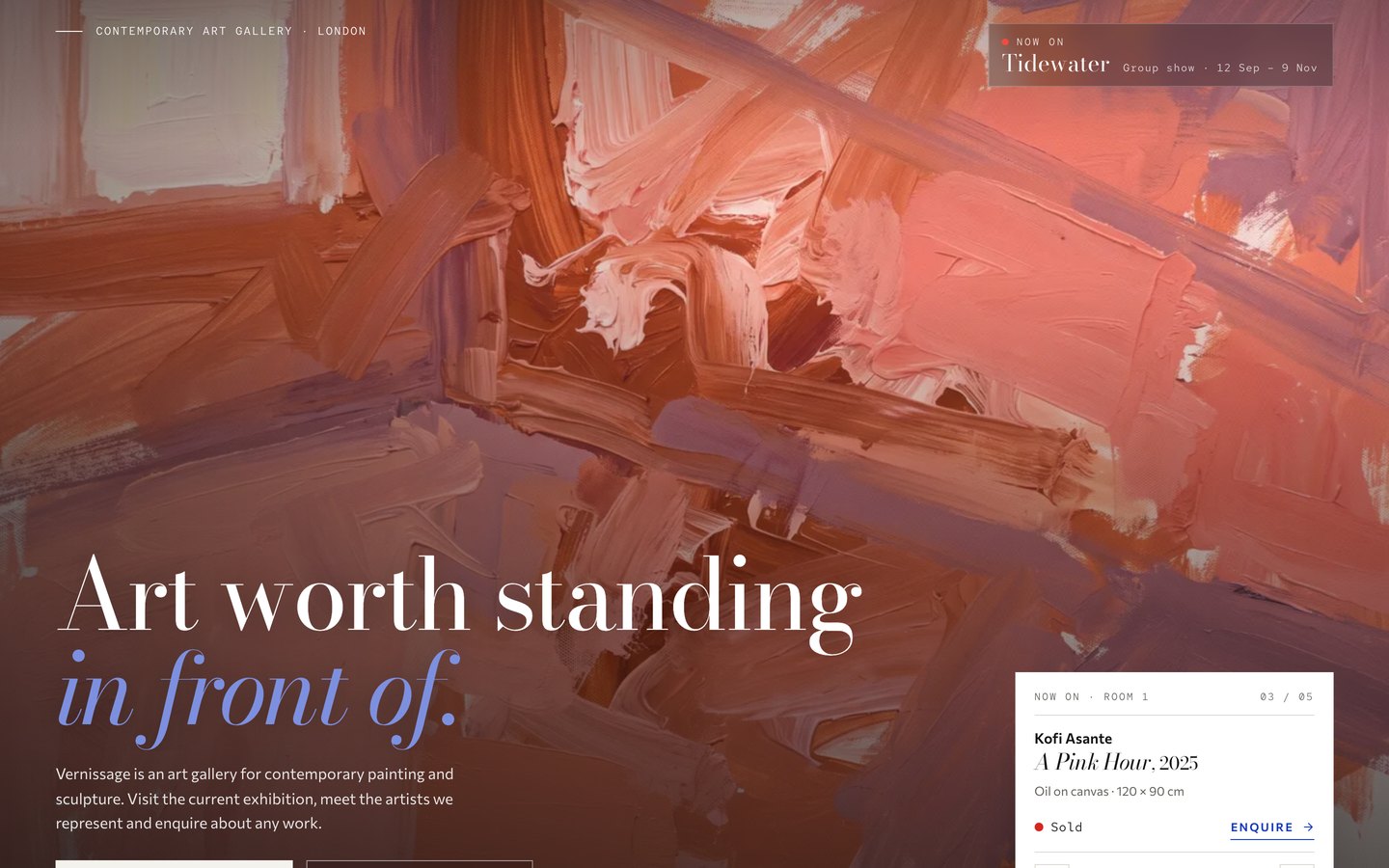
A quiet white-cube gallery for painters, galleries and museums. The current show is painted in stroke by stroke with museum wall labels, visitors walk the room by scrolling, and every artwork can be seen to scale on a wall before anyone enquires.
What's inside Vernissage
Signature moments
- The current show, painted in
Each work is painted in over the last by wide brush strokes, with a museum wall label, and scrolling hangs it on a lit wall.
- Walk through the room
A pinned gallery wall slides past as you scroll: every work with its label, spotlights, a bench and the door into Room 2.
- A salon hang of available works
Works hang salon-style at their real proportions; filter by kind and a label opens with medium, size and Enquire.
- View on a wall, to scale
Every artwork page can show the work at its real size above a sofa with a one-metre scale bar.
A real gallery
- Artists with bio and CV
Artist pages with a bio, a CV by year, their available works and the shows they were in.
- Exhibitions as posters
Current, upcoming and past shows as colour posters that stack as you scroll, each with its own page and works.
- Visit page with a floor plan
Opening hours, a live open or closed sign, a floor plan of the rooms and a drawn street map.
- Enquiries that arrive filled in
The contact form opens with the artwork’s wall label and topic already set, plus private view invitations.
Craft & care
- Eight collections, one Site row
Artworks, artists, exhibitions, press, journal, team and FAQ run every page; one Site row holds your details.
- A header that reads the wall
The bar turns light or dark to match the page under it, with a live opening-hours chip.
- Phone-first, keyboard-clean
Layouts checked down to 320 px, AA contrast everywhere and every control reachable by keyboard.
- Loader, transitions and a guide
A loader that switches the gallery lights on, “next room” page transitions and a Start Here owner’s guide inside.
Every page, ready to go
14 page types come with the remix, each with its own desktop, tablet and phone layout.
Who Vernissage is built for
A art gallery and artist portfolio website template built for art galleries, contemporary art galleries, artist portfolios, painters and sculptors and any business that sells the way they do.
From remix to live
Click Remix and the whole project copies into your Framer account.
Open the Start Here page inside the project: it lists every edit — words, colours, fonts, images, CMS rows — no code.
Add your domain in Site Settings and hit Publish. Email support from the person who built it if you get stuck.
Always included
- A Start Here page inside the project — every edit this template needs, listed
- Edit without code — colours, fonts, text and images from the properties panel and the CMS
- Free lifetime updates
- Email support: solofoundryhq@gmail.com
Get it
Questions, answered
Do I need to know how to code to use Vernissage?
No. Vernissage is a Framer template: every word, colour, font and image is edited on the Framer canvas or in the properties panel and the CMS. A Start Here page inside the project lists every edit a art gallery and artist portfolio site needs.
Do I need a paid Framer plan?
Not to remix and edit — a free Framer account is enough. To publish on your own domain you'll need a Framer site plan, paid to Framer, not to us.
What do I get?
The plain remix link: one click copies the whole Vernissage project into your Framer account. No email, no sign-up with us.
Can I use Vernissage for client work?
Yes — the free licence covers your own site or a client's. Reselling the template itself isn't allowed.
Is Vernissage responsive?
Yes. Vernissage ships with its own desktop, tablet and phone layouts, a real mobile menu, and it is checked down to 320 px wide before it is listed.
Can I get a refund?
It's free — remix it and try it. If you want more, All-Access is $199 once for every template we've made and every one we'll make.