June Akiyama — the graphic designer portfolio Framer template
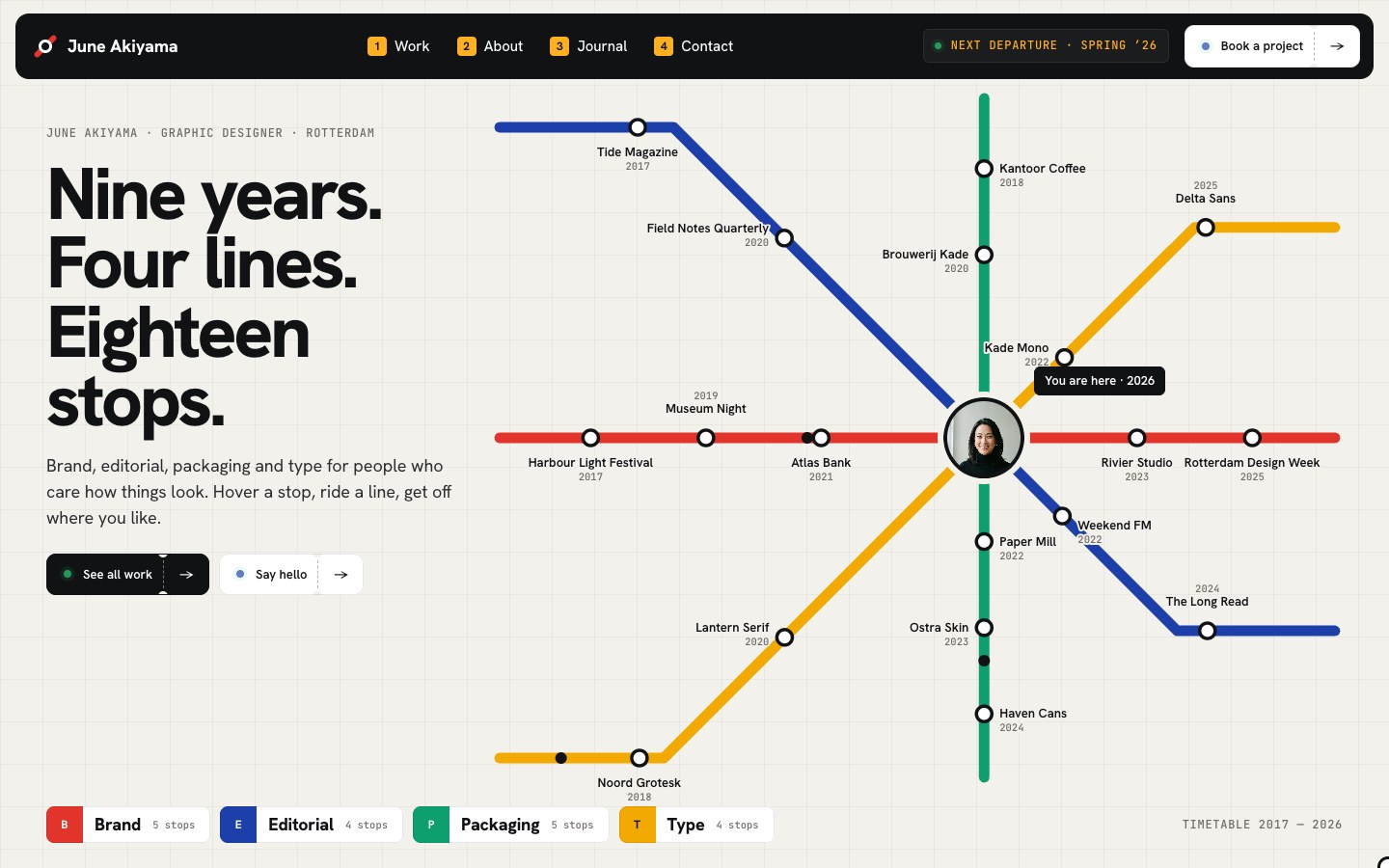
The graphic designer portfolio drawn as a metro map. Every project is a station, every kind of work is a coloured line, and the designer's portrait sits at the interchange; the lines draw themselves in, trains run along them and hovering a stop opens its cover, line and year. Below the map the site goes underground: hold the train doors open to step into a project, flip the departure board, ride a tunnel line by line, drag the poster wall, flip the enamel name sign, press a line on the ticket machine to print a fare, turn the station clock to a month, and drag a ticket through the gate to open the contact form. Projects, client notices and journal posts in the CMS, a metro-doors loader and page transitions, and a Start Here page.
What June Akiyama is
A graphic designer portfolio drawn as a metro map: every project is a station, every kind of work is a line, and the designer sits at the interchange. Below the map the site goes underground, and every section has one thing to do, from holding the train doors open to dragging a ticket through the gate.
What's inside June Akiyama
Signature moments
- A metro map of your work
Projects become stations on four coloured lines. The lines draw in, trains run, and hovering a stop opens its cover, line and year.
- Doors you hold open
Hold a button on the platform and the train doors slide apart to show a project full screen.
- A departure board
Your projects flip in on a split-flap board, and Next train flips to the next one.
- A tunnel ride per line
Scroll through a tunnel where each line takes over in its own colour.
Win the client
- A ticket machine for fares
Press a line and a ticket prints with the service, timing and starting fare.
- A station clock for dates
Turn the red hand to a month and the board says if there is a free seat.
- Client notices on an escalator
Testimonials ride up the escalator as you scroll.
- A ticket gate contact form
Drag the ticket onto the reader, the gate opens and the form slides up.
Made to edit
- Three CMS collections
Projects, client notices and journal posts, with a page for every project and post.
- Tidy styles
Colour and text styles in one place; rename or recolour a line once and the map follows.
- Start Here guide
A Start Here page walks through the first changes, plus a Design System page.
- Phone-first details
A platform menu, tap-twice stations and every scene tuned down to 320 px.
Every page, ready to go
9 page types come with the remix, each with its own desktop, tablet and phone layout.
Who June Akiyama is built for
A graphic designer portfolio website template built for graphic designers, brand and identity designers, editorial designers, packaging designers and any business that sells the way they do.
From remix to live
Click Remix and the whole project copies into your Framer account.
Open the Start Here page inside the project: it lists every edit — words, colours, fonts, images, CMS rows — no code.
Add your domain in Site Settings and hit Publish. Email support from the person who built it if you get stuck.
Always included
- A Start Here page inside the project — every edit this template needs, listed
- Edit without code — colours, fonts, text and images from the properties panel and the CMS
- Free lifetime updates
- Email support: solofoundryhq@gmail.com
Get it
Want it set up for you? We fit June Akiyama to your brand, colours, words and photos and hand you the finished site. From $99, template included.
See setup packages →Questions, answered
Do I need to know how to code to use June Akiyama?
No. June Akiyama is a Framer template: every word, colour, font and image is edited on the Framer canvas or in the properties panel and the CMS. A Start Here page inside the project lists every edit a graphic designer portfolio site needs.
Do I need a paid Framer plan?
Not to remix and edit — a free Framer account is enough. To publish on your own domain you'll need a Framer site plan, paid to Framer, not to us.
What do I get?
The plain remix link: one click copies the whole June Akiyama project into your Framer account. No email, no sign-up with us.
Can I use June Akiyama for client work?
Yes — the free licence covers your own site or a client's. Reselling the template itself isn't allowed.
Is June Akiyama responsive?
Yes. June Akiyama ships with its own desktop, tablet and phone layouts, a real mobile menu, and it is checked down to 320 px wide before it is listed.
Can I get a refund?
It's free — remix it and try it. If you want more, All-Access is $199 once for every template we've made and every one we'll make.