Second Chair — the video podcast & show Framer template
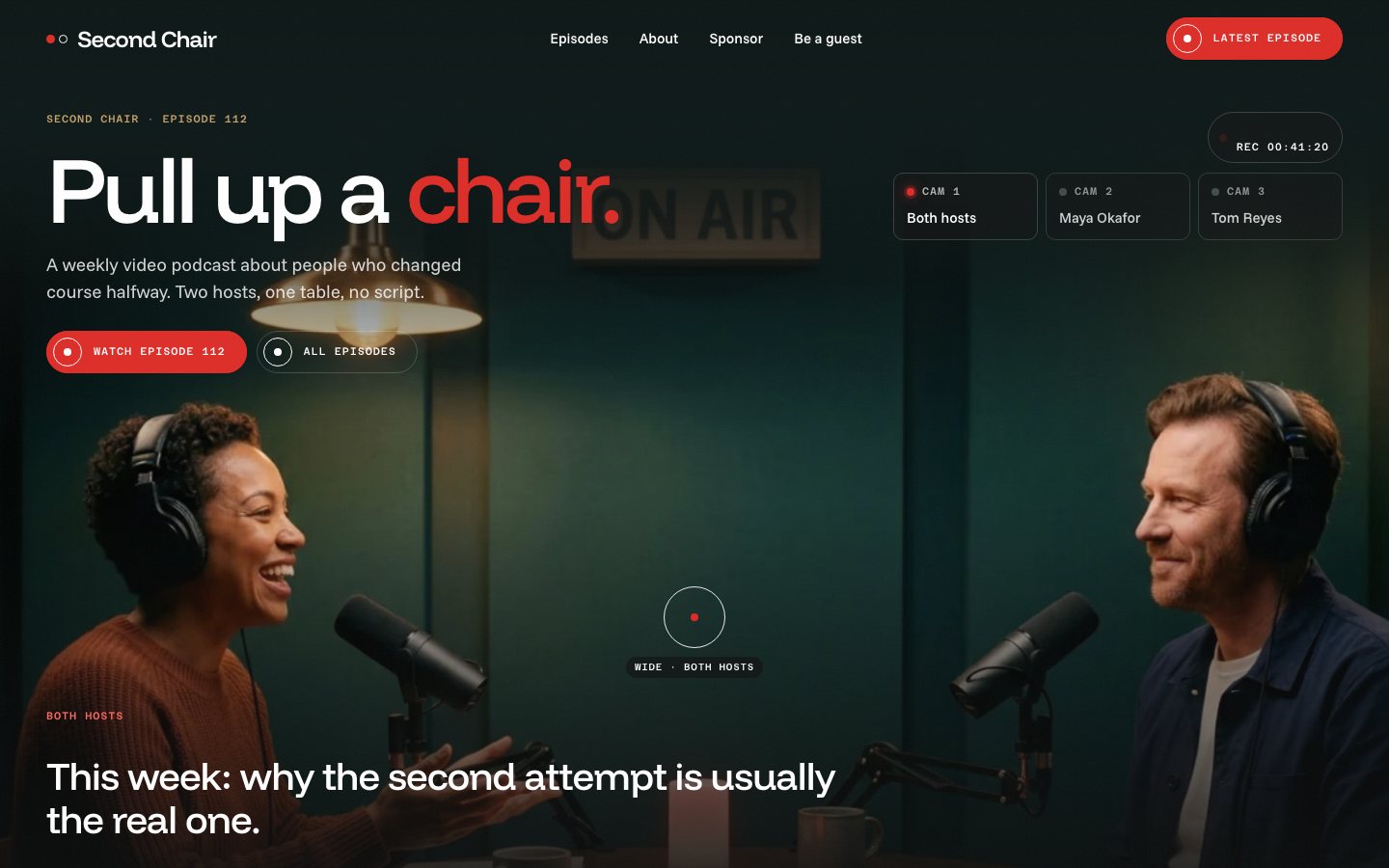
The podcast website built like a live video switcher. The hero is one studio shot of two hosts where the visitor's cursor is the director, cutting between the wide camera and each host's close-up with a red tally light, live captions, a running timecode and a REC dot. The latest episode has a chapter timeline you drag and a transcript that follows, the episodes wall drags with momentum, the hosts take turns on a pinned scroll, vertical clips scrub under the pointer, a sponsor rate card prices your run, a guest pitch types live over the empty red chair and listener voicemails play while you hold. Episodes, clips and voicemails in the CMS, sponsor and guest forms, a 3-2-1 countdown loader and cut transitions, and a Start Here page.
What Second Chair is
A podcast site built like a live video switcher: move the cursor across the studio and you cut between the wide camera and each host's close-up, with a red tally light, live captions and a running timecode. Below, every section has one thing to do, from dragging the episode timeline to holding a voicemail to play it.
What's inside Second Chair
Signature moments
- A multicam hero you direct
Move across the studio to cut between wide, host A and host B, with a tally light, live captions and a timecode. Phones auto-cut every few seconds.
- A chapter timeline you drag
The latest episode has chapter ticks you click or drag; the transcript jumps to the line and types it in.
- An episodes wall that pins
Scroll moves a pinned row of guests sideways, and you can drag it with momentum too.
- Voicemails you hold
Press and hold a listener voicemail: a ring fills and the words light up as it plays.
Grow the show
- A sponsor rate card
Pick pre-roll, mid-roll or host-read and slide 1 to 12 episodes; the price, discount and listens update.
- A guest pitch form
Type a pitch and it appears as a live caption over the empty red chair before you send it.
- Next-episode countdown
A live countdown to the next drop with a show-notes signup beside it.
- Two hosts, one pinned scene
The hosts slide in from each side on a pinned scroll; hover one to read their line.
Made to edit
- Three CMS collections
Episodes, clips and voicemails, with a page for every episode: art, guest, summary and show notes.
- Tidy styles
14 colour styles and the text styles in one place, so one red change carries through the motion too.
- Sponsor and guest forms
Styled fields with sending, sent and error states, plus a notes signup.
- Start Here guide
A Start Here page walks through the first changes: name, hosts, episodes, colours and the social image.
Every page, ready to go
8 page types come with the remix, each with its own desktop, tablet and phone layout.
Who Second Chair is built for
A video podcast & show website template built for video podcasts, interview shows, two-host podcasts, youtube talk shows and any business that sells the way they do.
From remix to live
Click Remix and the whole project copies into your Framer account.
Open the Start Here page inside the project: it lists every edit — words, colours, fonts, images, CMS rows — no code.
Add your domain in Site Settings and hit Publish. Email support from the person who built it if you get stuck.
Always included
- A Start Here page inside the project — every edit this template needs, listed
- Edit without code — colours, fonts, text and images from the properties panel and the CMS
- Free lifetime updates
- Email support: solofoundryhq@gmail.com
Get it
Want it set up for you? We fit Second Chair to your brand, colours, words and photos and hand you the finished site. From $99, template included.
See setup packages →Questions, answered
Do I need to know how to code to use Second Chair?
No. Second Chair is a Framer template: every word, colour, font and image is edited on the Framer canvas or in the properties panel and the CMS. A Start Here page inside the project lists every edit a video podcast & show site needs.
Do I need a paid Framer plan?
Not to remix and edit — a free Framer account is enough. To publish on your own domain you'll need a Framer site plan, paid to Framer, not to us.
What do I get?
The plain remix link: one click copies the whole Second Chair project into your Framer account. No email, no sign-up with us.
Can I use Second Chair for client work?
Yes — the free licence covers your own site or a client's. Reselling the template itself isn't allowed.
Is Second Chair responsive?
Yes. Second Chair ships with its own desktop, tablet and phone layouts, a real mobile menu, and it is checked down to 320 px wide before it is listed.
Can I get a refund?
It's free — remix it and try it. If you want more, All-Access is $199 once for every template we've made and every one we'll make.