Primer — the online course academy Framer template
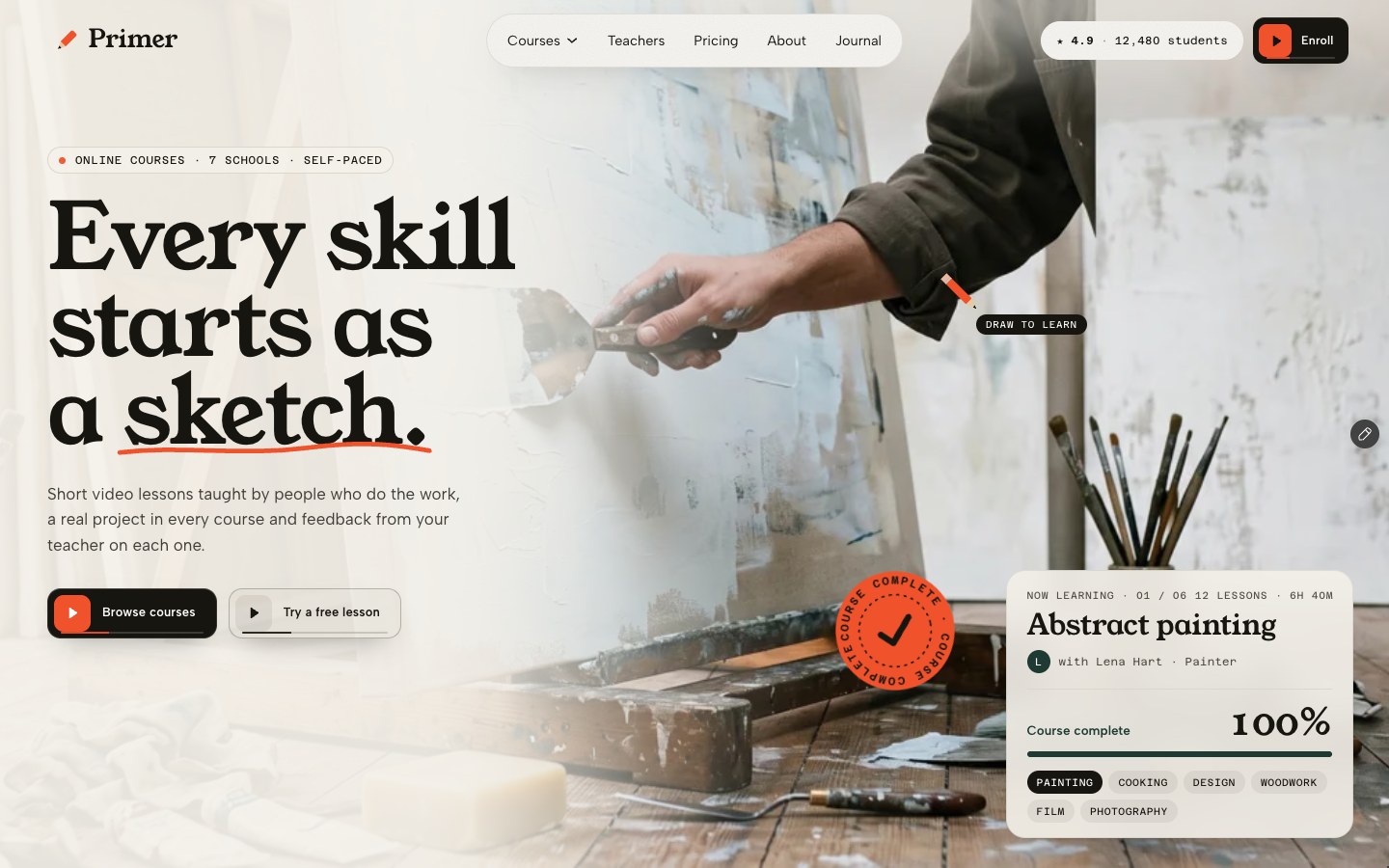
The online course and academy template drawn like a school notebook. A pencil loader, then every course opens as a sketch your cursor draws into the real photo while a meter counts what you have learned — then courses you flip through sideways, a method marked in red pen, a free lesson player with its syllabus, teachers on a contact sheet, report-card pricing and a three-step enroll page. 34 pages, 8 CMS collections.
What Primer is
An online course academy site where the hero is the lesson: each course photo starts as a pencil sketch and the visitor’s cursor draws it into the real photo. Behind it sit a filterable catalogue, course and teacher pages, a lesson preview, pricing and an enrol flow, all run by eight CMS collections.
What's inside Primer
Signature moments
- A hero that draws itself into a photo
Each course photo starts as a pencil sketch; the cursor colours in the real photo, a “You’ve learned” meter counts up, then the next course draws in.
- Courses you flip through sideways
The section pins and your courses slide past one by one, each with its project, teacher, lesson count and rating.
- A method marked in red pen
Watch, make, share, improve: four steps that pin on scroll and get annotated like a teacher’s notes on a page.
- A lesson preview with its syllabus
“Sit in on lesson one”: a preview player beside the lesson list with durations, filled from the Lessons collection.
Built to fill your courses
- A catalogue that filters and sorts
School tabs with live counts, a level filter and a sort menu over every course in the CMS.
- Course pages that answer everything
What you’ll make, who it’s for, the syllabus, what you’ll need and your teacher — one page per course, written from the CMS.
- Teachers on a contact sheet
Eight teachers as film frames you point at, each with a quote, years in the craft and a profile page listing their courses.
- Pricing and a three-step enrol page
Three plans with a monthly and yearly switch, then an enrol flow: choose a plan, add your details, start.
Content, motion & care
- Eight CMS collections
Site, Courses, Teachers, Lessons, Reviews, Plans, FAQ and Posts — edited from panels, and every course, teacher and post gets its own page.
- A journal and a wall of student work
Six posts with a contents list, share links and a reading meter, plus student reviews pinned up like a corkboard.
- A pencil loader and a page turn
On the first visit a pencil writes your name, skippable; between pages a notebook sheet turns to the next one.
- Phone-first, keyboard-clean
Its own desktop, tablet and phone layouts, AA contrast and every control reachable by keyboard.
Every page, ready to go
15 page types come with the remix, each with its own desktop, tablet and phone layout.
Who Primer is built for
A online course academy website template built for online course creators, online schools, academies, course platforms and any business that sells the way they do.
From remix to live
Click Remix and the whole project copies into your Framer account.
Open the Start Here page inside the project: it lists every edit — words, colours, fonts, images, CMS rows — no code.
Add your domain in Site Settings and hit Publish. Email support from the person who built it if you get stuck.
Always included
- A Start Here page inside the project — every edit this template needs, listed
- Edit without code — colours, fonts, text and images from the properties panel and the CMS
- Free lifetime updates
- Email support: solofoundryhq@gmail.com
Get it
Want it set up for you? We fit Primer to your brand, colours, words and photos and hand you the finished site. From $99, template included.
See setup packages →Questions, answered
Do I need to know how to code to use Primer?
No. Primer is a Framer template: every word, colour, font and image is edited on the Framer canvas or in the properties panel and the CMS. A Start Here page inside the project lists every edit a online course academy site needs.
Do I need a paid Framer plan?
Not to remix and edit — a free Framer account is enough. To publish on your own domain you'll need a Framer site plan, paid to Framer, not to us.
What do I get?
The plain remix link: one click copies the whole Primer project into your Framer account. No email, no sign-up with us.
Can I use Primer for client work?
Yes — the free licence covers your own site or a client's. Reselling the template itself isn't allowed.
Is Primer responsive?
Yes. Primer ships with its own desktop, tablet and phone layouts, a real mobile menu, and it is checked down to 320 px wide before it is listed.
Can I get a refund?
It's free — remix it and try it. If you want more, All-Access is $199 once for every template we've made and every one we'll make.